



57NETWORK
  • About Us
    • VALUES
  • Our Solutions
    • Smartsheet >
      • Smartsheet FAQ
      • SMARTSHEET SERVICES
    • BrandFolder
    • Bitdefender >
      • Bitdefender FAQ
      • BITDEFENDER SERVICES
    • ClickUp
    • Cloud PBX + SIP
    • TAILORED SERVICES
  • Blog
  • Events
  • CONTACT US

Microsoft Outlook web : How to undo send when you accidentally clicked send?

2/8/2022

 
Have you ever sent out an email accidentally and unable to undo it? The good news is, you can change the setting to delay the email sending even you clicked the send button. Once you set it, you can undo email sending within a short seconds, this could give you a short windows of time to undo your email sending.

NOTE : However, you are not able to undo it once your email has been sent out successfully, and you have to work around it by sending another email to inform your recipient regarding your mistake or whatsoever reasons. 

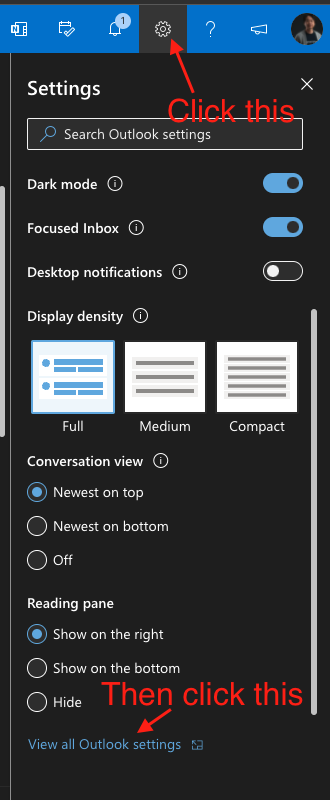
Step 1 : click the setting icon at the top right section of your Outlook Web

Picture

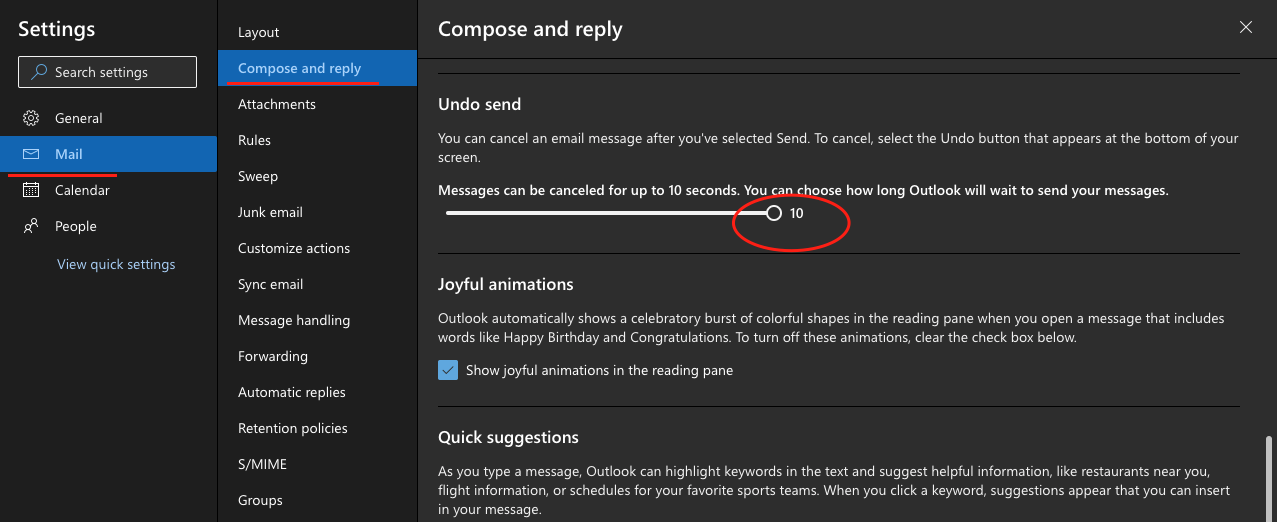
Step 2 : Under Mail > Compose and reply > under Undo Send, toggle the time to the longest value

Picture

Done!

    Categories

    All
    Company Events & News
    Resources For Managers
    Work Management Trends
    Work Productivity Tips

Care line: +603-9212 0157

Leave us your inquiry

Contact us
Picture
Reach us via Whatsapp

Picture
Picture
Picture
Picture
This company is registered with the Ministry of Finance, Malaysia.

​
Equip your organisation with digital solutions & training that inspire innovation and joy at work.
Copyright © 2025 57Network Consultancy Sdn. Bhd.
Company Registration number : 202001020346 (1376666-K) 
All rights reserved.

 Privacy Policy ​ | ​Integrity Pledge | Site Map

  • About Us
    • VALUES
  • Our Solutions
    • Smartsheet >
      • Smartsheet FAQ
      • SMARTSHEET SERVICES
    • BrandFolder
    • Bitdefender >
      • Bitdefender FAQ
      • BITDEFENDER SERVICES
    • ClickUp
    • Cloud PBX + SIP
    • TAILORED SERVICES
  • Blog
  • Events
  • CONTACT US